PRD-007: Jobs
Status: Implemented · 12 November 2026
Jobs supports private job searches. Each person starts with an empty profile, Jobs list and Companies list. They discover roles through Add a role or chat.
Search loop
Save a role → assess it against the search profile → apply or pass → prepare materials → follow up → record screening and interviews → respond to an offer or close the application. Backdating records the day someone actually applied.
Required behavior
- Jobs, companies, profiles, notes and application materials are private per signed-in user. Another person's UUID returns 404.
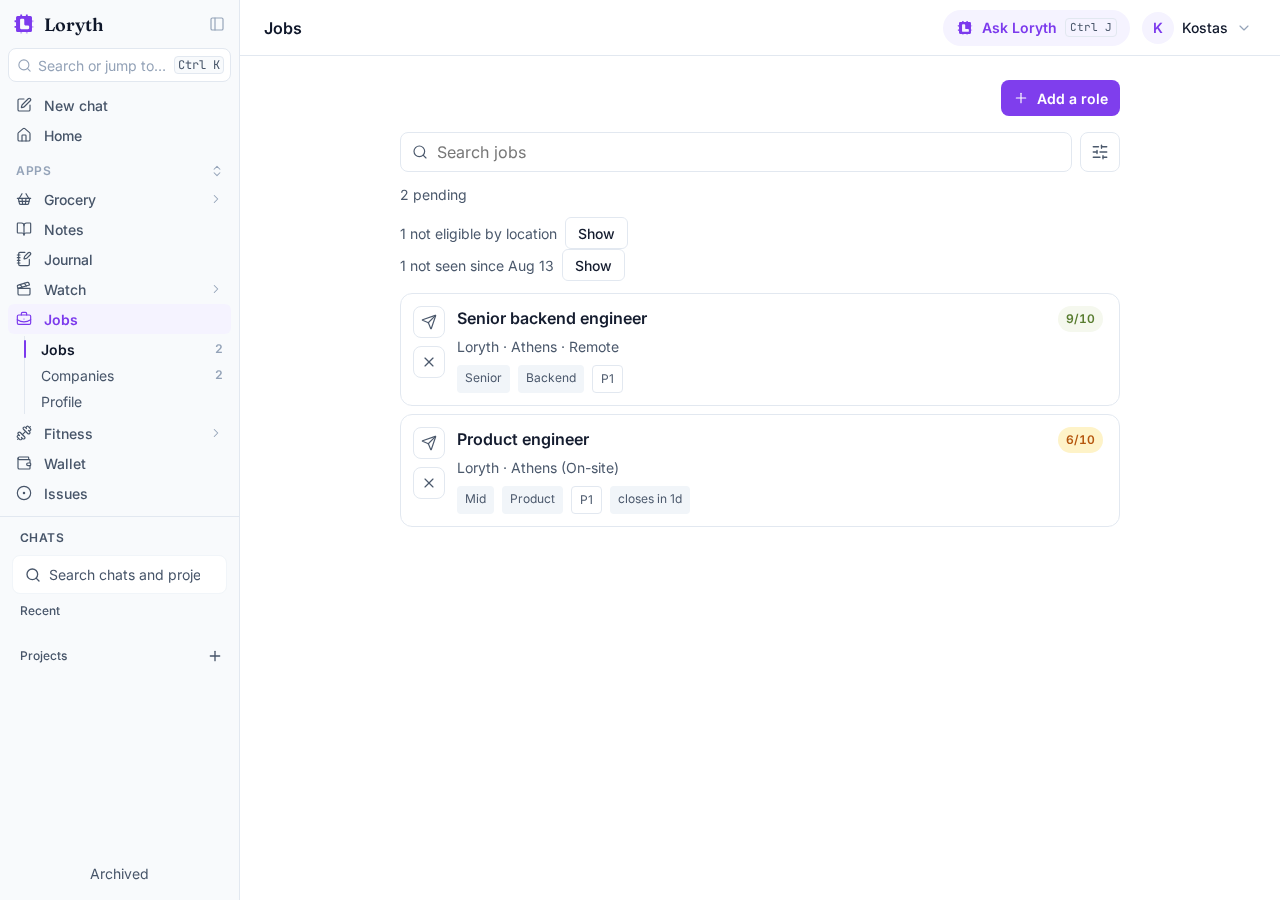
- The header contains Jobs and Companies pills, pending-job and company counts, an Add a role icon and a Profile icon. Pills stretch across the phone header.
/jobsopens Jobs;/jobs/companiesopens Companies. Today, Inbox, Shortlist, Applied and Archive have no web routes. - Jobs defaults to Pending. Pending means no application or an open Shortlisted application. Applied includes Applied, Screening, Interviewing and Offer, including closed applications. Passed means closed before applying, with no stage or a retained Shortlisted stage. Closing retains the last stage.
- Cards have stacked Apply and Pass icon buttons on the left. Apply records applying today; an Applied button stays pressed. Pass dismisses a pending job, withdraws an applied job, or reopens a passed job to Pending. Apply on a passed job reopens and applies in one undoable action. Every saved action offers Undo.
- Card titles open role details. Company and location appear below. Work mode is appended when the location does not mention it. The fit pill rounds to
9/10, with moss for rounded scores ≥8, amber for ≥6 and neutral below. Its tooltip retains the exact score and assessor; no assessment means no pill. - Labels show level, role, applied stage or closed reason, P0/P1 priority and real deadlines. Close deadlines use warning styling. Default ordering remains priority, fit, deadline, then newest ID.
- Search and a filter button replace list selects. The result line shows the count and status, plus Clear filters when search or checkboxes are active. Pending hidden groups remain disjoint: location, expired deadline, then not seen in 90 days. Each has a counted Show action below the result line.
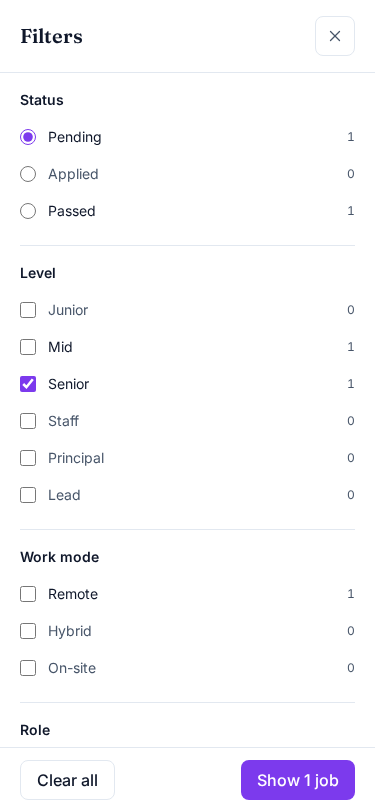
- Filters apply live through URL parameters. A left drawer has Status radios, Level, Work mode, Role and Company checkboxes. It fills phones below 768px and closes with Escape, the scrim, close or Show jobs. The badge counts checked checkboxes only. Each option counts matches with all other filters applied. Zero counts look muted. Role is hidden when there are no saved role values.
- Company choices are alphabetical and searchable. Checked companies stay visible, including zero counts; other positive-count companies fill six rows. Extra choices show “N more — search to find them”; the list has no inner scroll. If more than six companies are checked, all checked companies remain visible.
- Clear all in the drawer clears checkbox filters. Clear filters also clears the toolbar search. The Jobs status radio and hidden-group Show choices stay selected. Each tab retains its own search and filters during navigation.
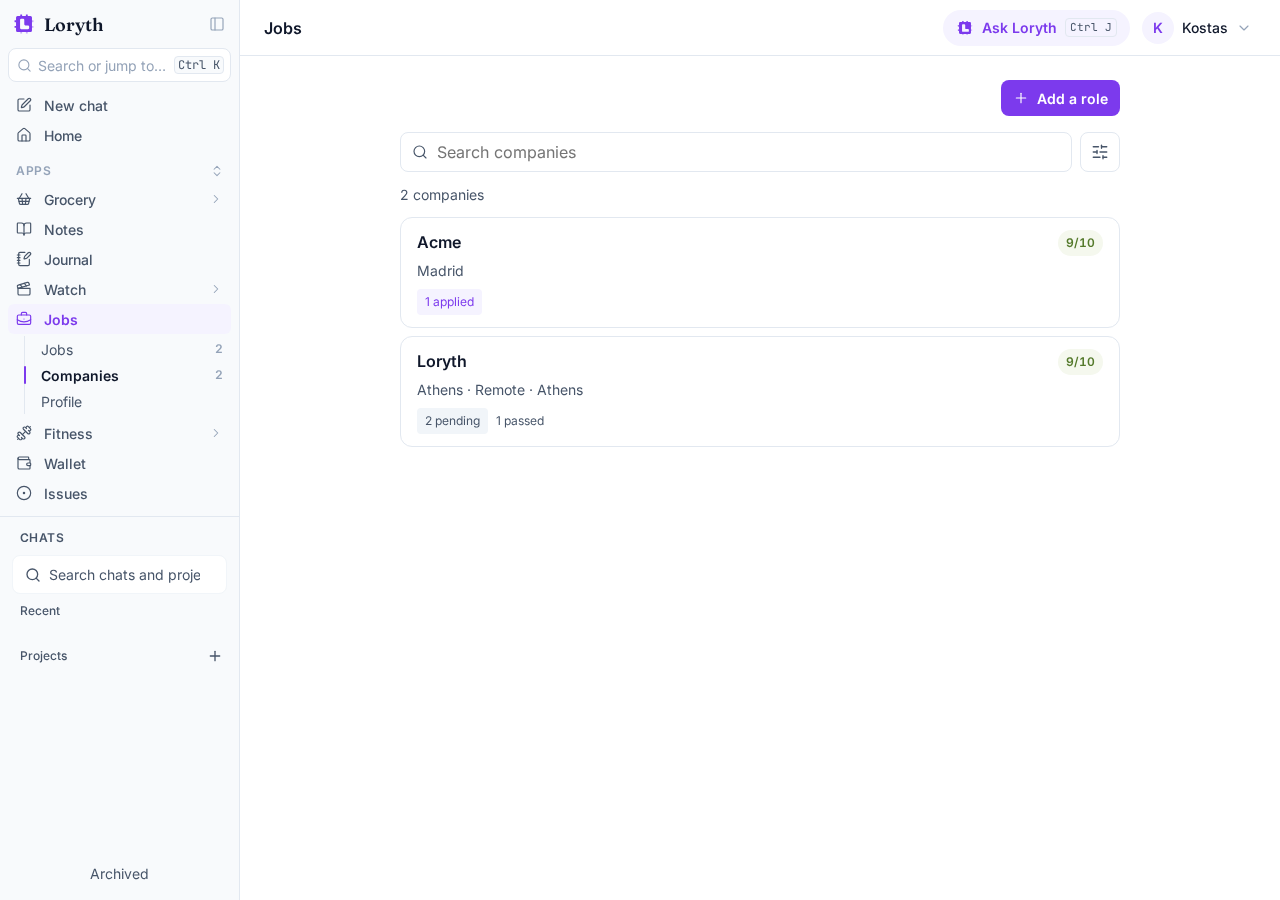
- Companies are alphabetical, with search and Status, Work mode and Role checkboxes. One job must match all selected sections for its company to match; values within one section are alternatives. Cards show the best assessed fit, distinct locations and counts of pending, applied and passed jobs.
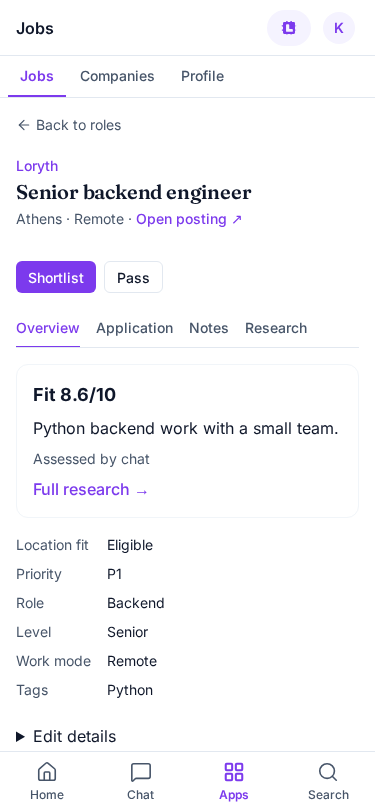
- Role details retain Overview, Application, Notes and Research, editable job details, materials and timeline. Level, work mode and free-text role can be saved from Add a role, Edit details and chat. Search profile autosaves.
- Stages still support historical Shortlisted data and forward progression. Accepted is available only at Offer. Undo refuses to discard later edits.
- MCP's seven Jobs tools include
get_jobs_today, which still uses the Today API for follow-ups, appointments, deadlines and week totals. The web Today screen is removed; the API remains for this caller. - Missing Jobs must not prevent the gateway or unrelated apps from starting.
Screens
See Jobs user stories and TD-0010.
Outside this release
Server scraping, background enrichment, calendar/email sync, notifications, workers, attachments, CV generation, contacts/interviews/offers tables, Kanban, charts, targets, native screens and bulk actions.