PRD-006: Fitness
| Field | Value |
|---|---|
| ID | PRD-006 |
| Title | Fitness — training and body tracking |
| Status | Draft |
| Owner | Loryth Team |
| Created | 2026-10-30 |
1. Problem Statement
People who train regularly keep their plan in one app, their workout log in another, their weight in a spreadsheet, and their meals in a third app. None of those tools talk to each other, and most of them are subscription services that sell the data they collect.
Loryth already records meals and macro targets in Grocery and daily reflections in Journal. Fitness adds the missing half: a catalogue of exercises, a fast workout logger, a weekly training schedule, body measurements with a weight goal, and reminders that nudge the user to train, eat, or weigh in. Nutrition stays in Grocery; Fitness reads it and shows it next to training so one screen answers "how is my regimen going today?".
2. Target Personas
| Persona | Priority | Relevance |
|---|---|---|
| Mindful Planner | Primary | Follows a weekly routine, tracks weight, wants training and meals in one place |
| Self-Hosting Tinkerer | Secondary | Wants to keep health data on their own server |
3. Features
3.1 Workouts
| Feature | Description |
|---|---|
| Exercise library | A built-in list of common exercises (squat, bench press, run, plank, ...) plus user-defined exercises. Each exercise has a category (strength, cardio, mobility, other) and a measurement kind that decides what a set records: reps and weight, reps only, duration, or distance and duration. |
| Workout record | A session with a start time, an optional end time, ordered exercises, and sets per exercise. The user logs sets as they go; the workout is "in progress" until they finish it. Perceived effort (1-10) and notes are optional. |
| Routines | Reusable workout templates: an ordered list of exercises with target sets, reps, weight, duration, or distance. Starting a workout from a routine pre-fills the exercises and target sets. |
| Exercise history | For each exercise: previous sets, best set, estimated one-rep max for weighted exercises, and a simple progress line over time. |
3.2 Meals
| Feature | Description |
|---|---|
| Nutrition today | Fitness shows today's recorded meals and calorie/macro totals against the dietary goal. The data comes from Grocery's existing nutrition endpoints; Fitness does not store meals. |
| Log a meal | "Log a meal" opens Grocery's quick-meal and recipe logging screens. No duplicate meal form in Fitness. |
| Meal reminders | A reminder of kind meal at a chosen time on chosen weekdays, for example "Lunch, 13:00, Mon-Fri". |
3.3 Goals
| Feature | Description |
|---|---|
| Body measurements | A dated log of weight, body-fat percentage, and optional girth measurements (waist, chest, hips). Weight is the only required value. |
| Weight goal | One active goal: start weight, target weight, target date. Progress shows weight change so far, remaining change, and a projected pace (change per week needed versus observed over the last 28 days). |
| Weekly schedule | The user assigns routines to weekdays, optionally with a time. The Today screen shows what is planned, and the week view shows planned versus completed sessions. |
| Workout and weigh-in reminders | Reminders of kind workout and weigh_in with the same time/weekday model as meal reminders. |
3.4 Reminders (cross-cutting)
- Reminders fire in the user's timezone on the selected weekdays.
- When due, the Fitness worker creates an in-app notification through the Notifications service.
- The Today screen also lists reminders due today, with a "done" state inferred from the data (a workout reminder is satisfied by a completed workout today; a weigh-in reminder by a measurement today; a meal reminder by a meal logged within two hours of its time).
4. User Flows
4.1 First visit
- The user opens Fitness from the sidebar. There is no data yet.
- The Today screen shows an empty state with three actions: "Start a workout", "Build a routine", and "Log your weight". Exercise library entries already exist, so the first workout can be logged immediately.
4.2 Log a workout (ad hoc)
- Today → "Start a workout". A workout starts now with no exercises.
- "Add exercise" opens a searchable picker over the library (recent exercises first).
- For each exercise the user taps "Add set"; the new row copies the previous set's values so logging the next set is one tap plus a correction. Each set has a "done" checkbox.
- "Finish" asks for optional perceived effort and notes, sets the end time, and returns to Today. An unfinished workout stays "in progress" and is offered to resume from Today.
4.3 Follow a routine
- Train → Routines → "New routine". Name it, add exercises, set targets per exercise.
- Plan → assign the routine to weekdays.
- On a planned day, Today shows the session with a "Start" button. The workout is pre-filled with the routine's exercises and target sets; the user only marks sets done and edits actuals.
4.4 Track weight toward a goal
- Body → "Log measurement": weight (required), body fat, girths, date (defaults to now).
- Body → "Set a goal": target weight and target date; start weight defaults to the latest measurement.
- The Body screen shows the goal card (progress bar, remaining kg, required pace vs observed pace) above the measurement chart and list.
4.5 Set a reminder
- Plan → Reminders → "Add reminder": kind, label, time, weekdays. The timezone is captured from the browser.
- When due, the worker creates an in-app notification. Today lists due reminders with their satisfied state.
4.6 Check nutrition next to training
- Today shows a compact macro bar (calories, protein, carbs, fat against goal) under the training plan.
- Nutrition shows today's meals in full; "Log a meal" goes to
/grocery/meals.
5. User Experience
- Sidebar entry "Fitness" with a dumbbell icon between Journal and Wallet.
- Section bar inside the app, matching Grocery's top/bottom nav pattern: Today, Train, Exercises, Body, Plan, Nutrition.
- Today is the home screen: planned sessions, in-progress workout, due reminders, latest weight and goal progress, macro bar.
- Workout logging is a focused screen (like Grocery's cook mode): the section bar hides, big tap targets, the previous set is one tap to repeat, "Finish" is always visible.
- Numbers are editable inline; no modal per set.
- Units: metric only in v1 (kg, km, cm). Display formatting uses the shared formatters in
@loryth-ui/domain. - Charts use the same lightweight sparkline/line style as the dashboard's metric sparklines.
- Design language: Wisteria Craft tokens only, Fraunces for the screen titles, Lucide icons at the standard stroke width.
- Empty states explain the next action and link to it; no dead ends.
- Web first. The mobile app has no feature screens yet; the Fitness screens are built from the shared contracts so a native implementation can follow.
6. User Stories
See Fitness user stories.
| ID | Story | Priority |
|---|---|---|
| US-FIT-001 | Browse and extend the exercise library | Must |
| US-FIT-002 | Log a workout | Must |
| US-FIT-003 | Build a routine | Must |
| US-FIT-004 | Start a workout from a routine | Must |
| US-FIT-005 | Review exercise history | Should |
| US-FIT-006 | Log body measurements | Must |
| US-FIT-007 | Set and follow a weight goal | Must |
| US-FIT-008 | Plan the training week | Must |
| US-FIT-009 | Get reminded | Should |
| US-FIT-010 | See nutrition next to training | Should |
| US-FIT-011 | See today at a glance | Must |
7. Functional Requirements
| ID | Requirement | Priority |
|---|---|---|
| FR-1 | Built-in exercise library seeded by migration; users add, edit, and archive their own exercises | Must |
| FR-2 | Exercise measurement kinds: reps_weight, reps_only, duration, distance_duration; the set form adapts to the kind | Must |
| FR-3 | Workout with ordered exercises and ordered sets; sets carry reps, weight (kg), duration (s), distance (m), and a completed flag | Must |
| FR-4 | Workout status in_progress → completed; at most one in-progress workout per user | Must |
| FR-5 | Routines with per-exercise targets; starting from a routine copies exercises and target sets into a new workout | Must |
| FR-6 | Exercise history: sets over time, best set, estimated one-rep max (Epley) for reps_weight | Should |
| FR-7 | Body measurement log with weight required and other fields optional | Must |
| FR-8 | One active weight goal per user; progress and pace computed server-side | Must |
| FR-9 | Weekly plan: planned sessions by weekday with routine and optional time; week adherence (planned vs completed) | Must |
| FR-10 | Reminders with kind, label, local time, weekdays, timezone, enabled flag; the worker creates in-app notifications when due, once per day per reminder | Should |
| FR-11 | Today summary endpoint aggregating planned sessions, workouts, latest measurement, goal, and due reminders for a date and timezone | Must |
| FR-12 | Nutrition screen and Today macro bar read Grocery's dietary goal and meal log; no meal storage in Fitness | Should |
| FR-13 | All data is private to the owning user; every query filters on user_id | Must |
8. Non-Functional Requirements
- Logging a set must be a single request and must not reload the workout screen.
- The Today endpoint must answer from indexed queries (date range on
started_at,measured_at). - The service follows the platform's layered architecture, SQL migrations, and integration-test conventions; it ships with the same Docker, gateway, and migration wiring as Journal.
- Reminder evaluation is idempotent: restarting the worker never duplicates a notification.
9. Out of Scope (v1)
- Imperial units and unit preferences.
- Wearable or GPS imports.
- Social features, sharing, coaching.
- Meal storage, food database, barcode scanning (Grocery owns these).
- Separate phone screens; the shared React DOM UI runs in Capacitor Android.
- Journal
activity_refitems for completed workouts (planned follow-up).
10. Acceptance Criteria
- A new user sees library exercises and can log a workout with sets within a minute (FR-1, FR-3)
- Finishing a workout records the end time and it appears in the workout list and Today (FR-4, FR-11)
- A routine assigned to today appears on Today and starting it pre-fills the workout (FR-5, FR-9)
- Logging weight updates the goal progress and the chart (FR-7, FR-8)
- A reminder due now creates one in-app notification and shows on Today (FR-10)
- The Nutrition screen shows the meals logged in Grocery for the same day (FR-12)
- Another user's data is never returned (FR-13)
11. Screenshots
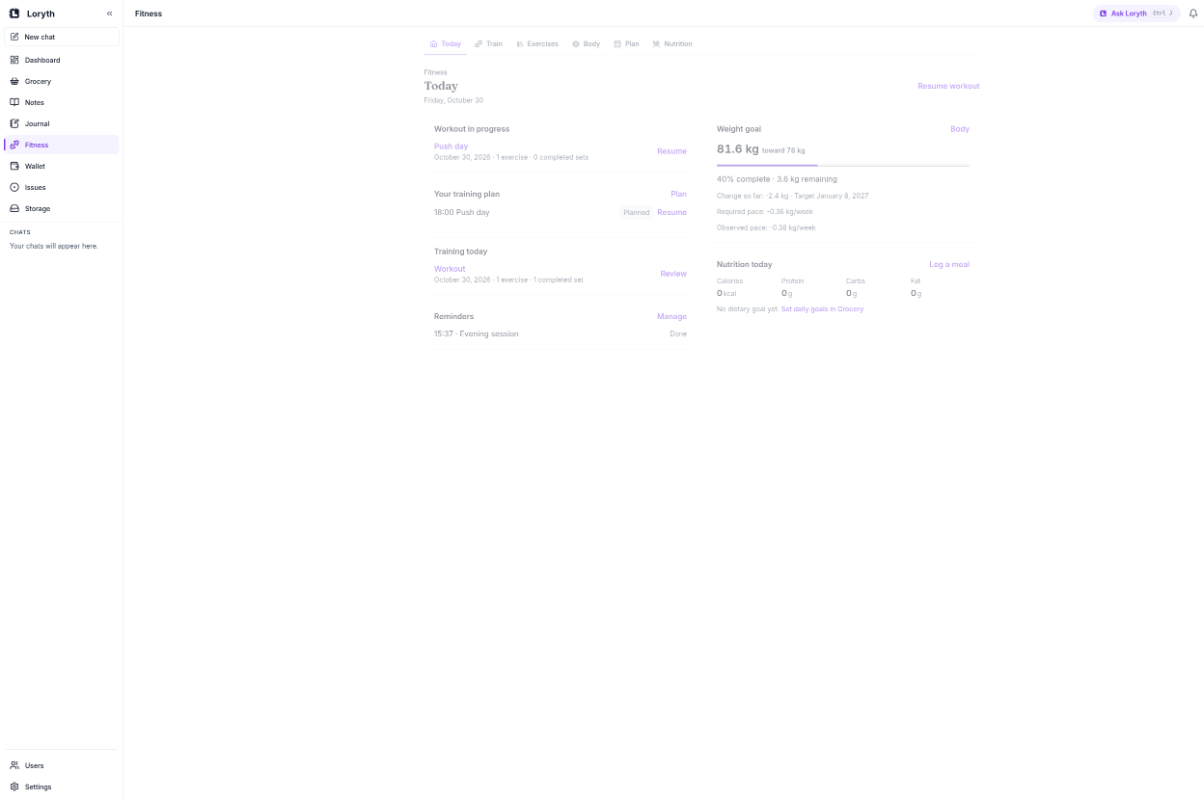
Today brings planned training, reminders, body progress, and nutrition together.
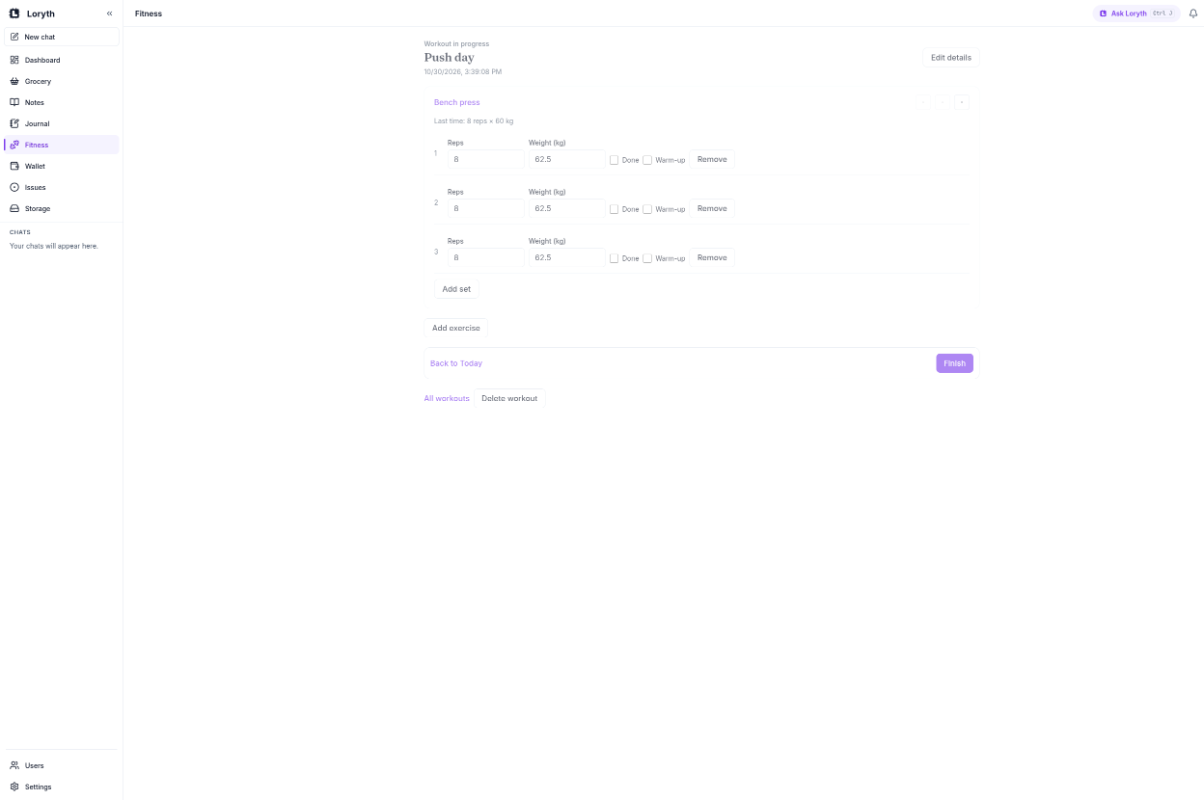
Workout logging keeps exercises, sets, and finish controls on one screen.
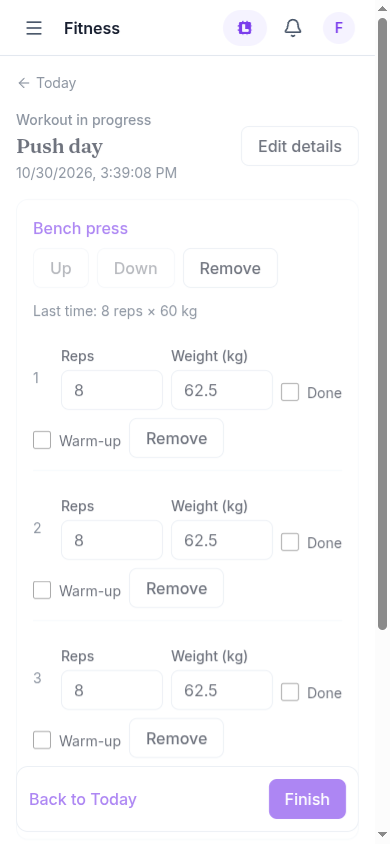
The workout logger adapts to phone width with inline set controls.
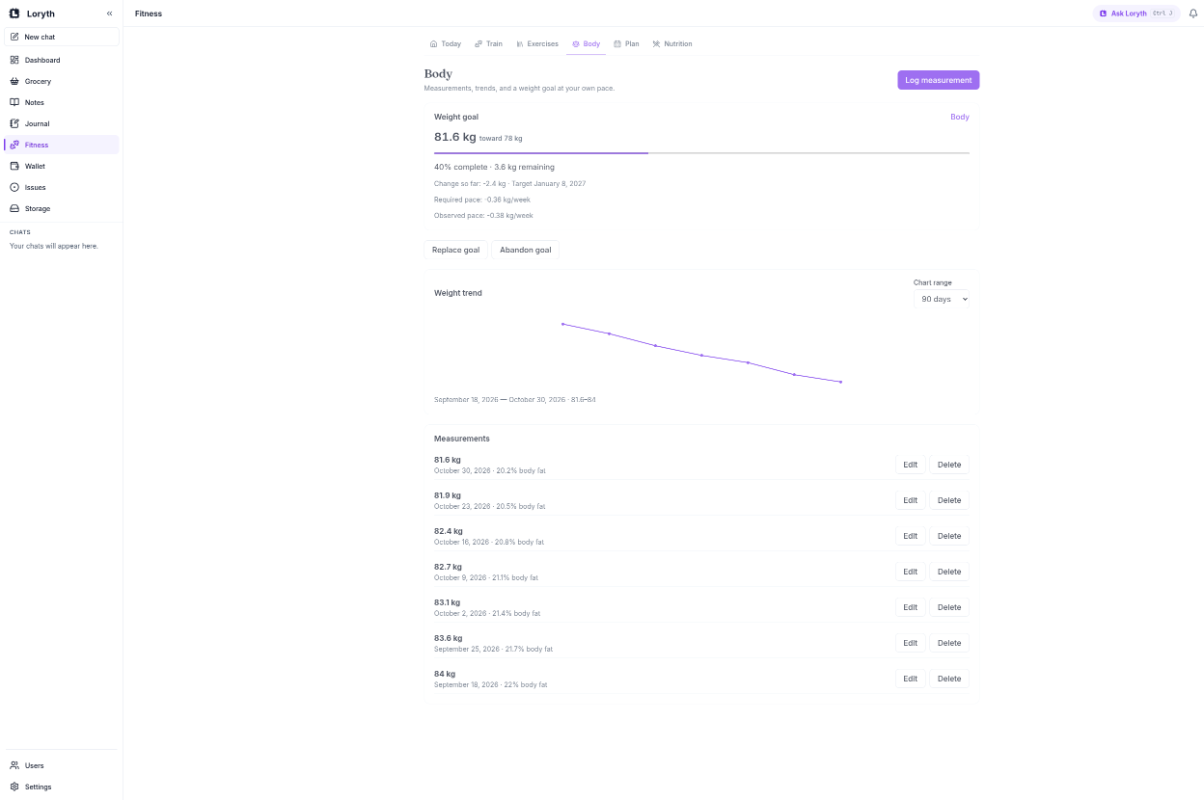
Body tracking shows weight history, measurements, and goal progress.
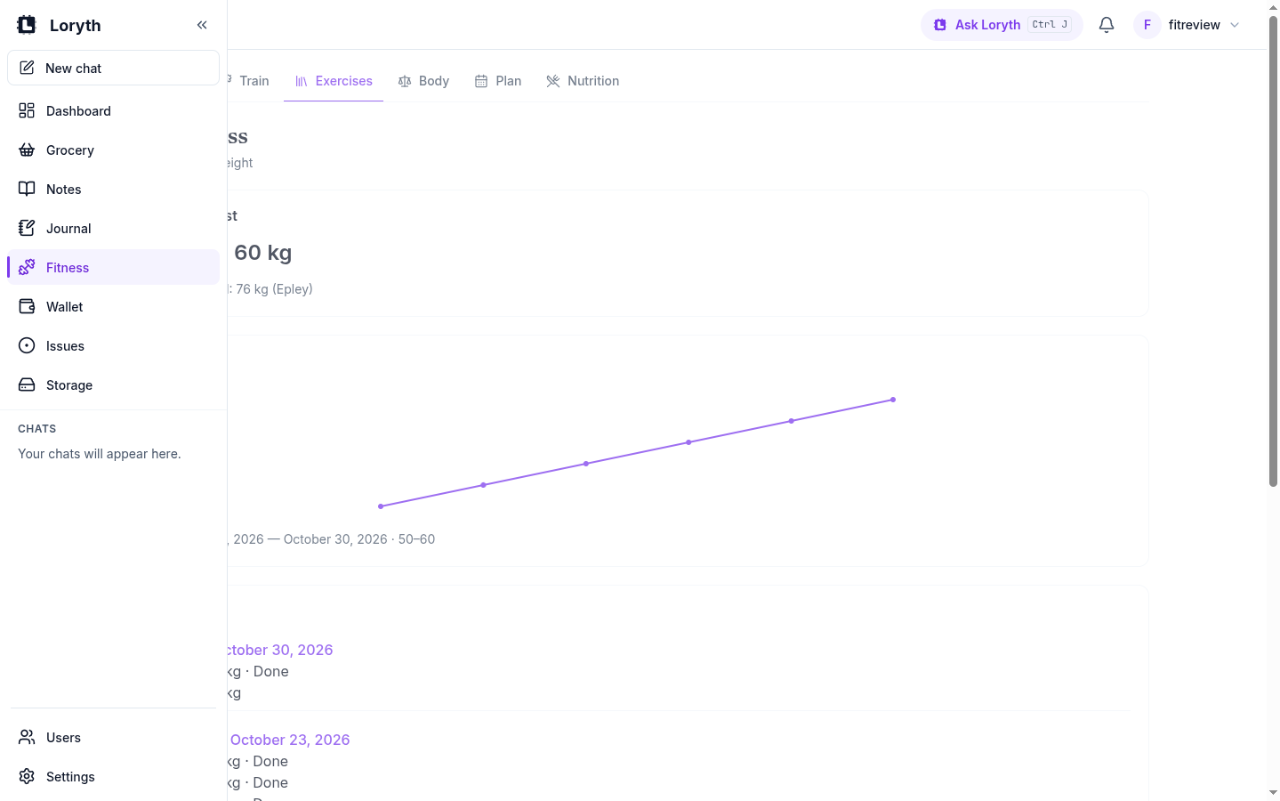
Exercise history shows previous sets and progress over time.
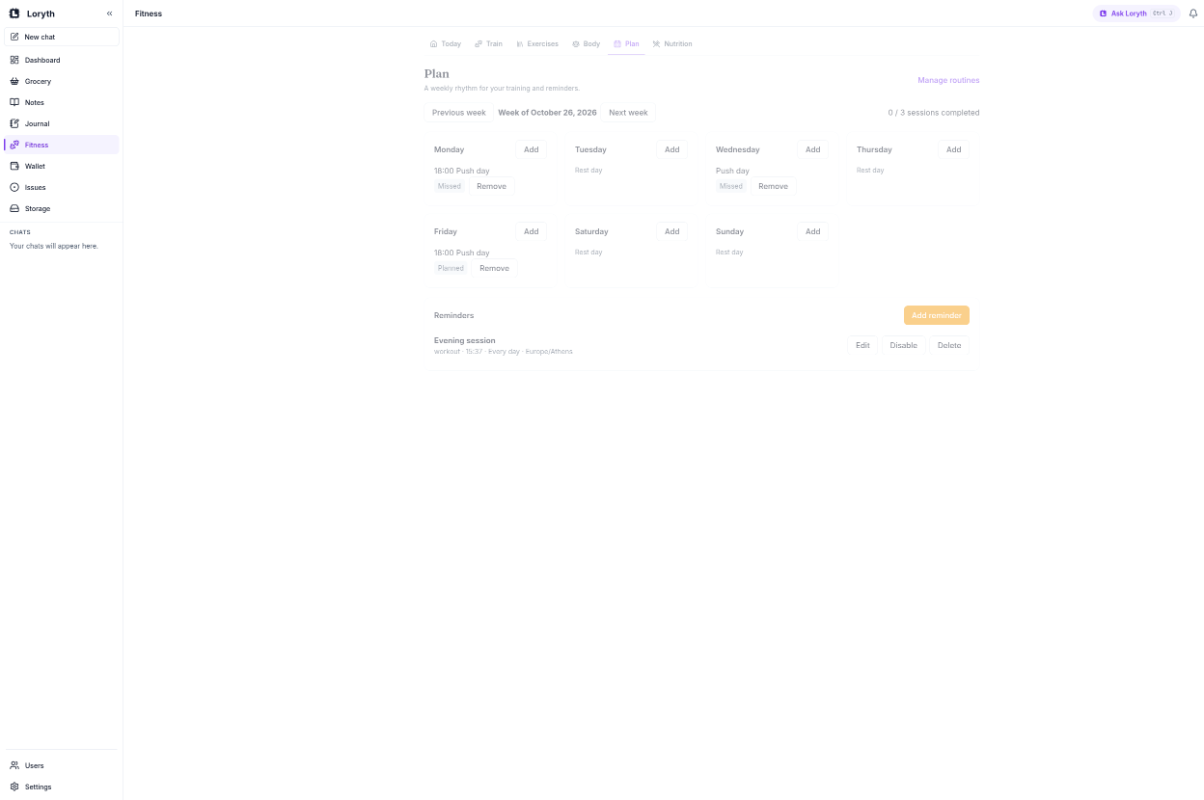
The weekly plan shows scheduled sessions and reminder settings.